International Assistant
International Assistant is a convenient online tool designed for customers to easily file their international inquiries.

Duration
5 Months
Client
United States Postal Service
Role
UI Design
UX Design
Problem
USPS handled over half a million international inquiries and claims annually, yet two-thirds were still managed by Customer Care agents despite an existing online form.
As a result, operational costs remained high, and customers experienced a frustrating support process that often required phone assistance.
Before Experience
The existing online inquiry form was a static, multi-step process that required users to complete everything on their own without guidance.
Key usability issues:
-
Users had to interpret requirements without clear instructions
-
High cognitive load due to too many fields shown at once
-
No clear step-by-step progression
-
No save functionality, forcing users to restart if interrupted
As a result, users frequently made errors or abandoned the process and contacted Customer Care instead.
Goals
-
Create a clear, conversational user experience.
-
Decrease Customer Care Center calls
-
Increase self-service use for international inquiries
-
Make the process simpler


Approach
Explorations
We initially explored improving the existing form with minor updates. However, usability findings showed that the core issue was structural, not visual.
Users struggled with understanding what information was needed and when. This led us to move from incremental improvements to a full redesign focused on guided interaction.
Key Trade-offs
-
Redesign approach
Chose a full structural redesign to address usability issues like confusion and drop-off, instead of surface-level improvements.
-
Experience vs. constraints
Designed a conversational, step-by-step flow while working within existing USPS system limitations.
-
Content strategy
Simplified instructions and reduced unnecessary steps to make the process easier to understand without losing required information.
Navigating Constraints
-
Worked within existing USPS backend systems
-
Followed USPS design standards and accessibility requirements
-
Balanced simplicity with operational and regulatory needs

Solution
I led UX design across 10 sprints using a human-centered design process, working closely with stakeholders to align user needs with system capabilities.
The redesign focused on reducing uncertainty and guiding users through each step.
Key Design Decisions
-
Guided conversational flow
Replaced a long static form with a step-by-step experience to reduce cognitive load and help users understand what to do next.
-
Auto-filled shipment data
Pre-populated known information to reduce manual input and minimize user errors.
-
Progressive disclosure
Displayed only relevant fields based on user input, preventing overwhelm and improving clarity.
-
Save and resume
Allowed users to pause and return later, reducing abandonment caused by interruptions.
-
Accessible and consistent UI
Designed with accessibility in mind and aligned with USPS design standards for consistency.
Experience Improvement
Before
-
Static form with little guidance
-
Users responsible for figuring out requirements
-
High chance of errors and abandonment
-
No flexibility to pause or resume
After
-
Step-by-step guided experience
-
Clear instructions at each stage
-
Reduced errors through structured input
-
Save-and-resume for flexibility


Making Inquiries Feel Natural
I designed the experience to adapt to user input in real time. For example, selecting a reason for inquiry dynamically updates the next steps, so users only see relevant questions.
This keeps the process focused and reduces unnecessary effort.
Encouraging Online Completion
I simplified the flow into clear steps and added save-and-resume functionality so users could complete the process on their own time.
This reduced the need to call Customer Care and increased successful online submissions.
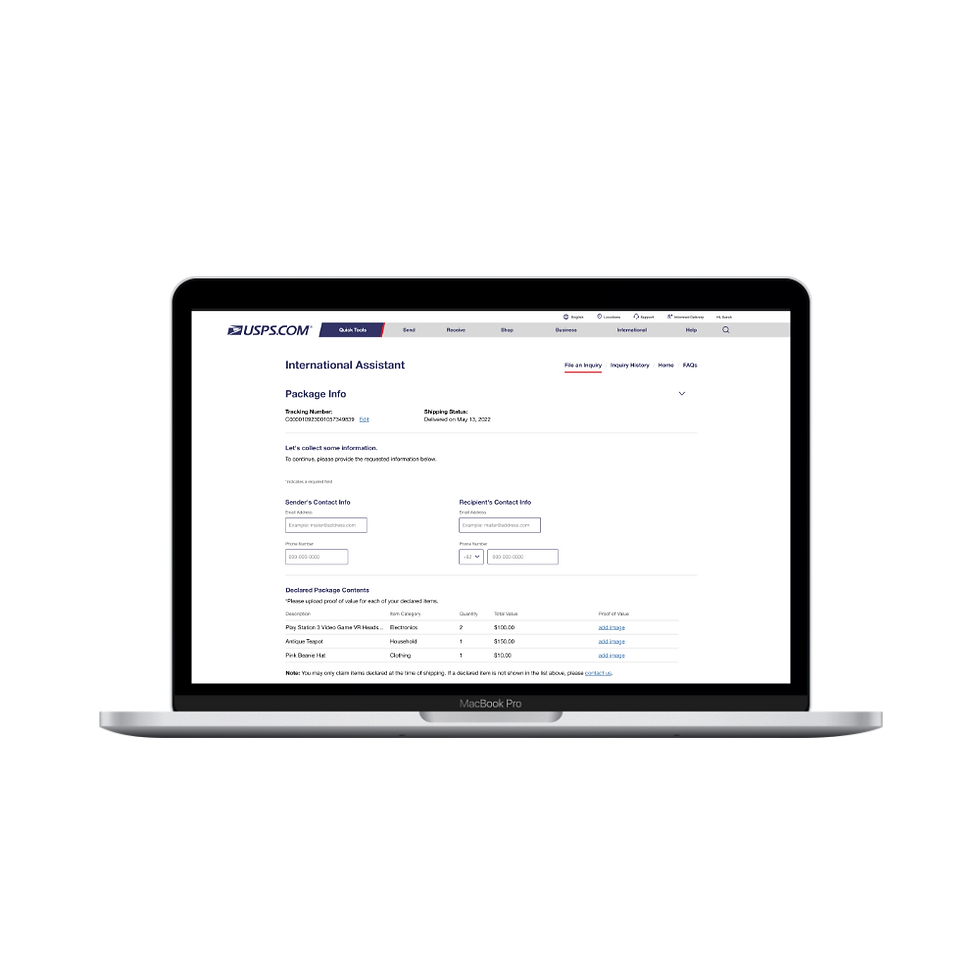


Designing for Everyone
I designed the experience to adapt to user input in real time. For example, selecting a reason for inquiry dynamically updates the next steps, so users only see relevant questions.
This keeps the process focused and reduces unnecessary effort.
Results
The redesigned experience improved usability and reduced reliance on Customer Care.
Observed and expected outcomes
-
Increased task completion rates during usability testing
-
Reduced user errors through guided input and automation
-
Improved user confidence throughout the process
-
Decreased dependency on Customer Care for support
Impact
-
Estimated $800K annual savings from reduced call volume
-
Increased self-service adoption
-
Faster completion times
-
Consistent, accessible experience aligned with USPS standards
Learnings
Clear, step-by-step guidance and simple language significantly improve completion rates.
Designing with accessibility and system constraints in mind early helps reduce rework later.
Breaking complex processes into smaller, guided steps creates a more usable and scalable experience.
Interested in more of my work or how I could apply this to your projects? Let’s connect!
